
BeagleConnect Torque#
Download BeagleConnect Torque schematic PDF. This release asset is generated from the latest revised KiCad schematics on main.
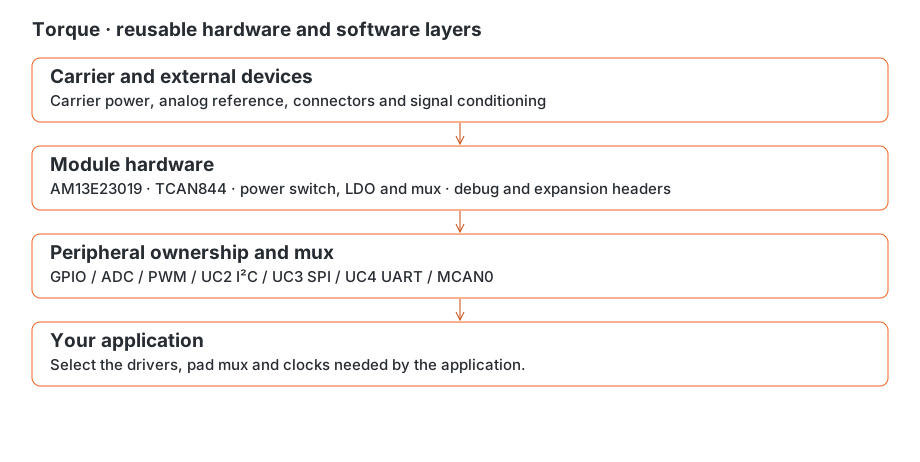
Welcome to BeagleConnect Torque manual. This small controller module brings together an AM13E23019 microcontroller, CAN transceiver, power selection and accessible debug and expansion connections. Use it for sensing, timed outputs, communications or control on a carrier of your own. The module is reusable and can operate independently of BeagleConnect QuadESC.
The module ships with TI ROM BSL only. Start with power and programming access, then load the application for your project. If you are designing a carrier, the interface and pad references help you connect the peripherals your project needs.
Find an answer#
First connection: Getting started and power.
Pin or peripheral: Interface cheat sheet and complete connector reference.
Software: Programming an application, debugging and peripheral checks and boot/recovery.
New carrier: Carrier integration, analog inputs and timed outputs.
BeagleConnect Torque product brief#
Product description#
BeagleConnect Torque is a compact processor module for motor control, motion control and CAN-based sensing, actuation and display designs. It combines a TI AM13E23019 200 MHz Arm Cortex-M33 microcontroller with 512 KB flash, 128 KB SRAM, a TinyEngine neural-network accelerator, a trigonometric math unit and hardware security capabilities.
Torque is the central controller in BeagleConnect QuadESC, a four-channel brushless DC motor electronic speed controller. The standalone solder-down module is intended for custom carriers, rapid prototyping and production designs. The motor gate drivers and power transistors are on BeagleConnect QuadESC, not on Torque.
The design is developed in the USA, with assembly in Michigan as specified for the product. Editable hardware designs and firmware sources are available in BeagleConnect QuadESC repository. Production origin, compliance, certification and ordering details require release confirmation.
Applications#
Drone electronic speed controllers, including BeagleConnect QuadESC as a four-channel carrier.
Robot joints and wheel drives, gimbals, actuators, positioning stages, pumps and fans.
Field-oriented control (FOC), sensorless control and custom motion algorithms with suitable application firmware and external power stages.
Local neural-network inference for motor fault and anomaly detection with application-specific models and firmware.
CAN-FD sensor, actuator, indicator, power and protocol-bridge nodes; DroneCAN requires application firmware.
Education and research in motor control, embedded communications and edge AI.
Development and production#
Load custom firmware through Serial Wire Debug (SWD) or the TI ROM bootstrap loader (BSL) over CAN, I²C or UART. The module ships with TI ROM BSL only. ROM CAN settings and boot configuration are documented in boot and recovery; application protocols configure their own clocks and interfaces.
Support targets community-aligned mainline Zephyr and OpenOCD. Validate board support and programmer compatibility for each release. Hardware capability alone does not establish released DroneCAN, FOC or motor-diagnostics firmware.
Use the underside LGA interface to integrate Torque into a custom carrier. BeagleBoard.org Foundation and its community provide an engagement path, with professional hardware and software consulting available through the ecosystem. Open source hardware certification and its identifier require confirmation.
Key features and specifications#
Item |
Value |
|---|---|
MCU |
TI AM13E23019, Arm Cortex-M33, 200 MHz; current PCB U1 is XAM13E23019GTPZ in a 100-pin package |
Memory |
512 KB flash; 128 KB SRAM |
Acceleration |
TinyEngine NPU, trigonometric math unit and floating-point unit |
Security |
MCU secure boot, secure debug, secure firmware update and cryptographic acceleration; application configuration and provisioning required |
Motor control |
Controller for four three-phase motor channels on BeagleConnect QuadESC; external power stages and application firmware required |
CAN hardware |
U2 TCAN844DRBRQ1 transceiver; J5 four-pin JST-GH connector: 1 +5V, 2 CANH, 3 CANL, 4 GND |
CAN termination |
R10 120 Ω resistor switched by U3 TS5A3166YZPR; MCU PC0 / |
Qwiic |
J4: ground, 3.3 V, I²C SDA and SCL |
Expansion |
Two 12-pin rows, J3/J6, exposing UART, SPI, analog, PWM and mikroBUS-related control signals; use the actual module pinout for compatibility |
Analog |
30 assigned ADC pads; external VAA/VREFHI reference required |
Debug and boot |
J2 eight-pin row: SWDIO, SWCLK, UART TX/RX, reset, boot invoke, ground and 3.3 V debug input |
Carrier power |
Nominal regulated 5 V at |
Debug power |
Separate 3.3 V input at J2.1, selected by TPS2116 mux; CAN still requires its 5 V rail |
Supply qualification |
Module input tolerance, accessory current budget and operating temperature require assembled-board qualification |
Mounting |
100-pad underside LGA, 1.27 mm pitch, 0.6 mm pads |
PCB outline |
25.4 mm width × 38.1 mm length, with a southwest relief |
PCB stackup |
Four-layer FR-4; 0.035 mm copper per layer (nominal 1 oz); 1.6 mm PCB thickness |
Assembled dimensions |
Component/cable clearance in addition to the PCB outline; total height and net weight to be measured |
Firmware |
TI ROM BSL at shipment; load application through CAN, I²C, UART or SWD |
The connector supply rails share their capacity with onboard loads. See power for digital and analog supply paths and carrier integration before designing a mating board. PCB thickness is not assembled module height.
Physical data, compliance and packaging#
Field |
Status |
|---|---|
Product name |
BeagleConnect Torque |
PCB length / width |
38.1 / 25.4 mm |
Net weight / assembled height |
Measure production unit |
Country of origin |
USA design and Michigan assembly stated; final production origin audit pending |
NDAA |
Production BOM and supplier compliance audit required |
RoHS / REACH |
Planned; declarations and production verification pending |
Open source hardware certification |
Certification and identifier to be confirmed |
Standalone package |
One Torque module; static-shielding bag and final packaging to be confirmed |
Product configurations |
Standalone module or integrated BeagleConnect QuadESC controller; release ordering details to be confirmed |
Board views#
The top and underside assembly views identify components, connectors and mounting geometry. They are design illustrations, not production photographs. Use the editable PCB outline and full mating footprint for manufacturing.
Sources and release checks#
Hardware values above come from som/som.kicad_pcb and som/mcu-core.kicad_sch, som/power.kicad_sch, som/can-transceiver.kicad_sch and som/io-connectors.kicad_sch, at repository commit 1fe0bbf0fa20e1aa848fa81a7b839ce0438ad440. The connector reference and interface guide provide electrical mappings.
MCU capabilities are specified by the TI AM13E23019 product page and AM13E230x datasheet. MCU features and ratings do not establish the finished module’s qualification or software release status.
The current PCB/schematics and som/som_bom_with_mpns.csv use differing component and connector references. Reconcile the production BOM before procurement or compliance signoff. Confirm the production MCU ordering code, module supply/current/temperature limits, unit weight and height, packaging, certification, and released firmware/tool support before publishing final production claims.
Getting started#
BeagleConnect Torque ships with TI’s ROM bootloader (BSL) only. Load your application before using its sensing, communications or timed outputs. The module can serve a custom carrier or a standalone development setup.
Power and connections#
Find J2 using the connector locator and pad table. Check pin 1 from the board view before making a cable.
Supply 3.3 V digital debug power at J2.1, or use regulated carrier power at the
+VDCpads as described in power. Check the probe’s power direction before connecting it.Choose a programming interface. For SWD, connect J2.2 SWDIO, J2.3 SWCLK, J2.7 reset and J2.5 ground, plus the probe’s required supply/reference connection. For ROM UART, connect module TX at J2.4 to host RX and module RX at J2.6 to host TX, with ground at J2.5 and compatible logic levels.
To invoke BSL, hold J2.8 (
BSL_INVOKE, PA6) high during reset or power-on. Use a host programmer that supports this MCU’s TI BSL protocol. An ASCII serial terminal is not a BSL programmer.Program and verify your application’s image at its linked address. Release BOOT low and reset to run it. Follow programming an application for image-layout and debug checks.
Debug power runs the digital circuitry. ADC acquisition also needs VAA, and the CAN transceiver needs its 5 V supply. The power diagram shows these separate paths. Boot and recovery gives the ROM CAN settings and recovery connections.
Check your application’s first output#
For TI’s XDS110 probe, follow XDS110 wiring and CCS setup, including the separate power-input and voltage-reference connections.
Choose an observable startup action in your application, such as a debug breakpoint or UART message. For UART, configure UC4 on PA0/PA1 and use matching host settings. The interface guide lists the mux values. If startup is silent, check the linked image address, boot selection and UART configuration using debugging and peripheral checks.
Explore the interfaces#
Choose ADC, PWM, I²C, SPI or CAN resources using the interface cheat sheet. The analog guide explains acquisition and conversion; timed outputs covers shared timers, output pairs and capture.
For a custom carrier, start with carrier design, which brings together power, shared pins, external devices and programming access.
Identification and mechanical reference#
BeagleConnect Torque is a 25.4 × 38.1 mm controller module built around the XAM13E23019GTPZ 100-pin MCU. U2 is the TCAN844DRBRQ1 CAN transceiver, and U3 switches bus termination. U4, U5 and U6 handle power selection, load switching and digital regulation.
Connector orientation#
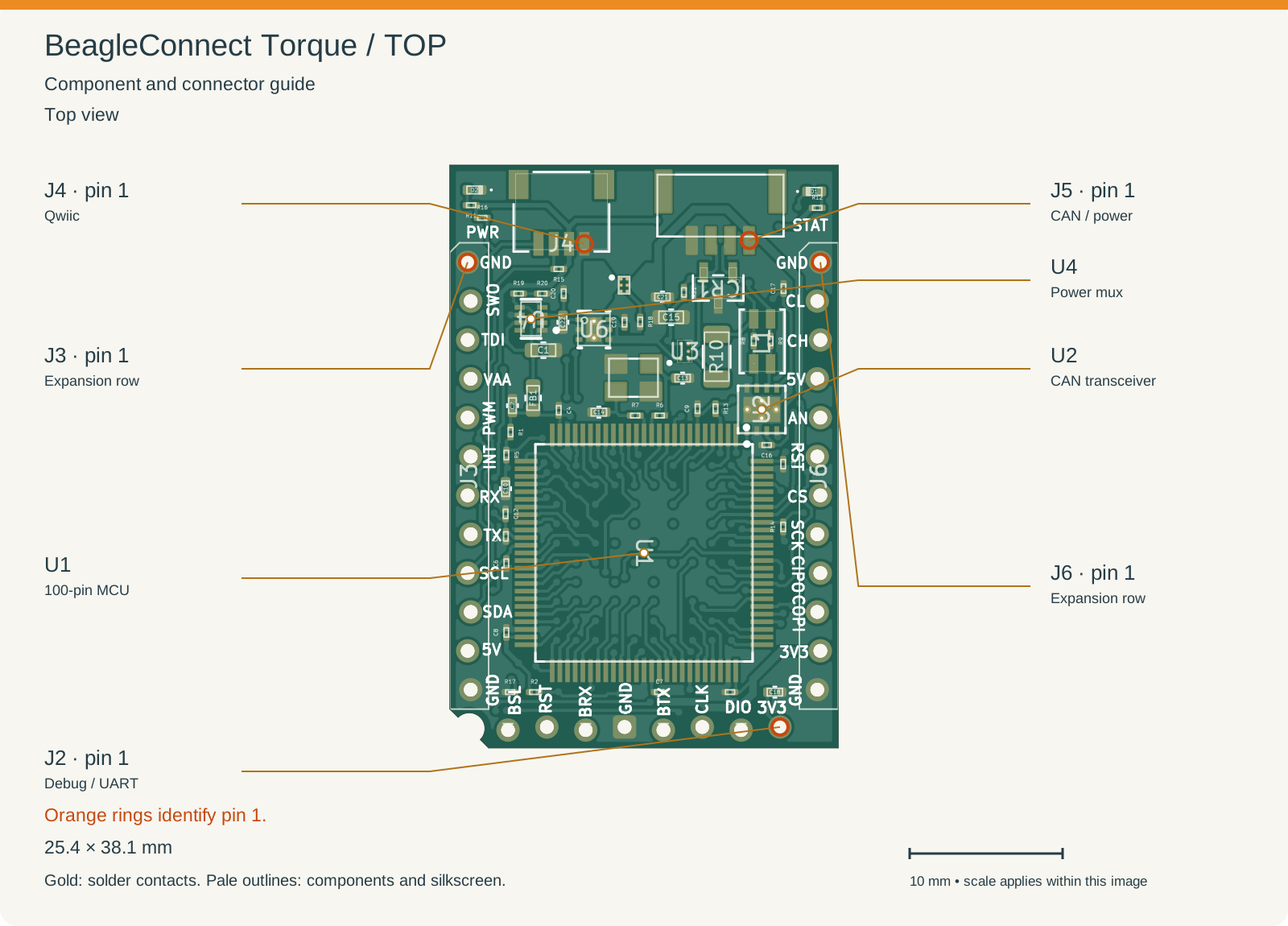
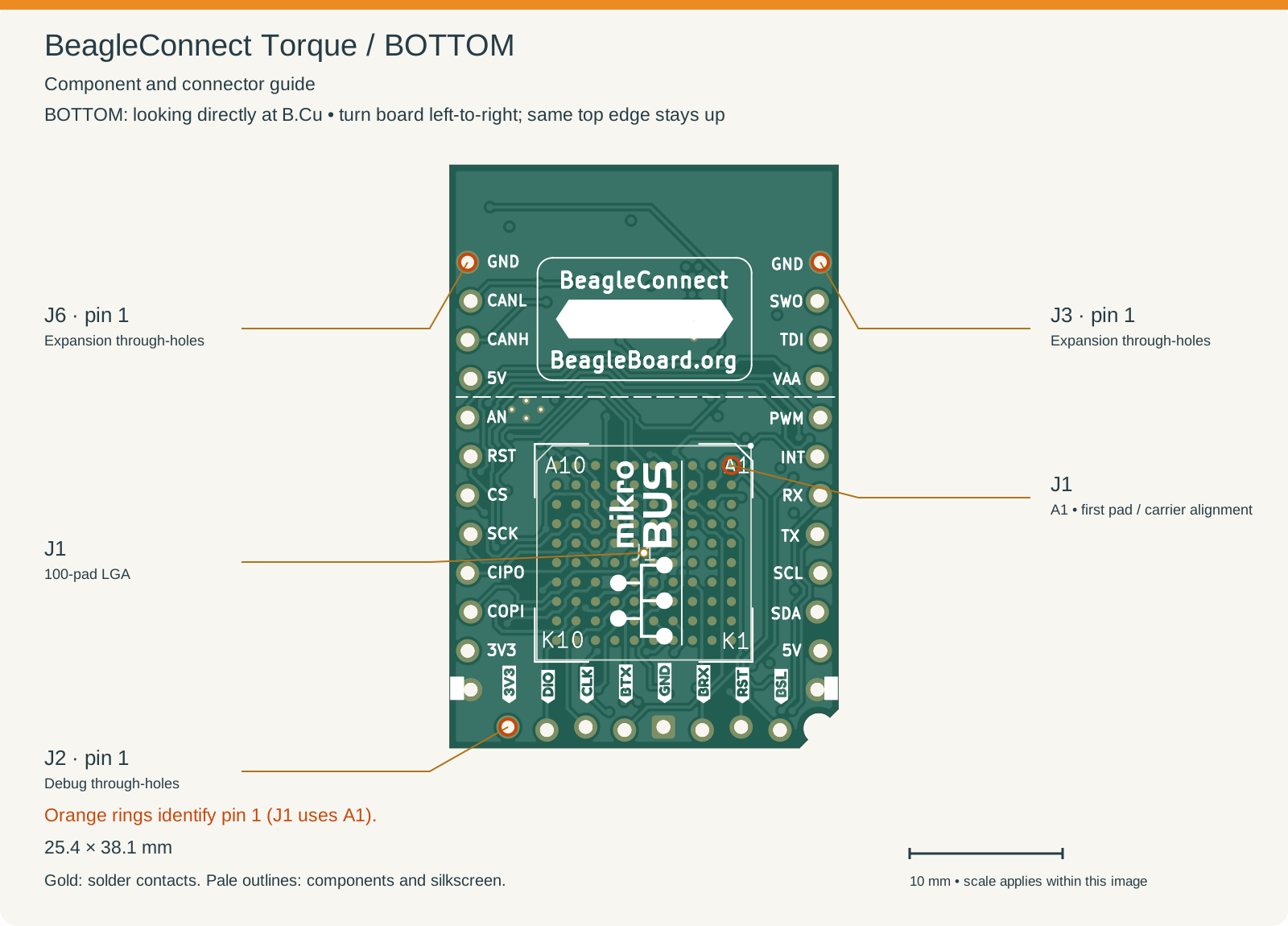
Use these assembly views to find connectors and components. Reference labels match the KiCad board files. Select an image for a closer look.
Orange rings and connector leader lines identify pin 1. J1 uses an alphanumeric pad grid, so its first pad is A1, marked in the bottom view. J4 and J5 signal contacts are on the top side; their pin 1 markers appear in the top view. Markers refer to board pads, not the mating face of a cable plug.
Top looks down at F.Cu. Bottom looks directly at B.Cu after turning the board left-to-right, keeping the same top edge up. Left and right therefore reverse; the bottom drawing is not a view through the board. Use the connector pad table for electrical assignments.
Connector |
Purpose |
First pad |
|---|---|---|
J1 |
Underside 100-pad LGA interface for a carrier |
A1: |
J2 |
Eight-pin debug, UART, reset and boot row |
1: |
J3 |
Left expansion row in top view; 12 pins |
1: |
J4 |
Qwiic I²C connection |
1: |
J5 |
CAN bus and power |
1: |
J6 |
Right expansion row in top view; 12 pins |
1: |
The nominal PCB outline has a southwest relief. Use the KiCad board outline when checking mating geometry and assembly clearance.
Mechanical integration#
J1 uses 1.27 mm pitch with 0.6 mm pads. The two expansion-row origins are 22.86 mm apart. Successive row pad centers advance by 2.54 mm, with alternating lateral stagger. Match the complete 12-pin row geometry when designing a mating connector.
Allow space for connectors, cables and assembled components as well as the bare PCB outline. For a soldered carrier, the assembly notes explain the module stencil and mating-array paste arrangement. Keep the debug row accessible if you expect to program or service the module after installation.
Power and analog reference#
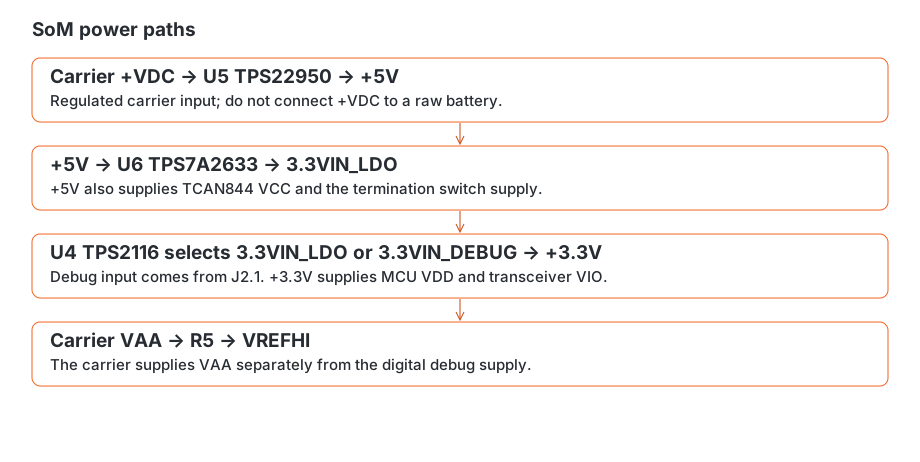
The SoM has two digital power paths: regulated carrier power through the underside array, and a separate 3.3 V debug input. An onboard mux selects between them. Analog measurements use the separate VAA connection.
Digital paths#
Carrier power enters on +VDC and reaches VIN and ON of U5, a TPS22950 load switch. Its output is the module’s +5V rail. U6, a TPS7A2633 regulator, takes that rail at IN and EN and produces 3.3VIN_LDO.
U4, a TPS2116 power mux, receives 3.3VIN_LDO on input 1 and the J2.1 debug supply, 3.3VIN_DEBUG, on input 2. Its output is +3.3V, which powers MCU VDD and the TCAN844 VIO connection.
Use regulated carrier power at +VDC. U5 switches the supply; it does not reduce its voltage. Raw battery power must not be connected here.
Connection |
Net/path |
How to use it |
|---|---|---|
J1 D5, D7, E4, E6, F7, G4, G6 |
|
Regulated carrier supply input |
J2.1 |
|
Digital power input; check the debugger’s power direction |
J5.1; J3.11; J6.4 |
|
Shared supply rail, also needed by the CAN transceiver |
J6.11; J4.2 |
|
Digital rail shared with onboard loads |
J1 F5; J3.4 |
|
Separate analog reference input |
Reference and sequencing#
VAA reaches VREFHI through R5. ADC results scale with this reference: a change in reference voltage changes the voltage represented by each count. See analog acquisition for conversions and sampling.
Debug-only power is useful for communicating with the MCU. To read analog inputs, also supply VAA; to communicate over CAN, supply the transceiver’s 5 V rail.
When connecting external devices, avoid driving signals above an unpowered receiver’s supply rail. Check how the carrier, debug supply and connected accessories behave when one is powered and another is off, including possible reverse-current paths.
Supply limits#
The connector rails share their capacity with the module’s own circuitry. Available accessory current depends on the input supply, regulator voltage drop and temperature. Include those loads when sizing the carrier supply, and check rail voltage and heating with accessories connected. Component limits alone do not establish the assembled module’s load-current rating.
Interface cheat sheet#
Choose an interface here, then follow the connector reference to find its physical pins. MCU package pins and connector pad numbers use different numbering systems.
Interface |
MCU route / example mux |
Connector access |
Practical use |
|---|---|---|---|
Application / ROM UART |
UC4 TX PA0 pin 20; RX PA1 pin 21; mux 7 |
J2.4 TX, J2.6 RX; J1 A3/C3 |
Application UART or ROM BSL access, using the protocol for the active boot mode |
Additional UART |
UC1 TX PB21 pin 87; RX PB22 pin 88; mux 8 |
J3.7 / J3.8 |
Additional serial connection with application configuration |
I²C |
UC2 SDA PA22 pin 93; SCL PA23 pin 94; mux 4 |
J4.3/4 and J3.10/9 |
Shared two-wire bus; configure controller transactions with completion timeouts |
SPI |
UC3 MOSI PC6 pin 5; MISO PC4 pin 3; SCLK PC2 pin 1; mux 6 |
J6.10/9/8 |
Configure mode, word length and chip-select timing for the connected device |
CAN controller |
MCAN0 TX PA12 pin 73; RX PA11 pin 72; mux 10 |
On-module U2, bus J5.2/3 and J6.3/2 |
Application-configured CAN traffic through the on-module transceiver |
Debug |
PA13 SWDIO, PA14 SWCLK |
J2.2 / J2.3 |
Core access and programming through a compatible probe |
Analog |
30 assigned pads across ADC0–2 |
J1; AN on J6.5 is PA28 |
Application-scheduled acquisition with the carrier-supplied reference |
Timed output |
MCPWM output routes on exposed pads |
J1; PB12 also J3.5 |
Continuous PWM; outputs on each module share a period |
Expansion control |
PB2 INT, PA20 reset-purpose GPIO, PA21 CS-purpose GPIO |
J3.6, J6.6, J6.7 |
GPIO connections for interrupt, reset or chip-select roles in the application |
ROM transport is a separate capability#
ROM CAN uses 1 Mbit/s nominal/data, CAN-FD without BRS, and IDs 3/4. Follow the boot-clock and BOOT-pin setup in boot and recovery. Application CAN requires its own controller, clock and pad initialization.
CAN termination control#
PC0, MCU pin 97, controls the CAN termination switch through CAN_TERM. This signal is also available at J1.B9. Configure PC0 as a GPIO output to select termination for the module’s position on the bus. PB9 is a separate GPIO at J1.K7.
Multiplexing rules#
A pad uses one selected digital function at a time. Choosing PWM on a pad replaces its GPIO function; analog inputs need the appropriate analog configuration. The GPIO download lists MCU package pins, board nets and connector access to help you follow each route.
The expansion rows each have 12 pins. J6.2/3 carry CANL/CANH, and J4 provides Qwiic access to I²C. Use the module’s pinout when connecting accessories, including the power and ground pins.
Connector and pad reference#
Use these tables to find a signal, check a connector pin or lay out a mating board. Pad numbers and net names follow the KiCad PCB. Each row represents one electrical pad number on one connector. Check the connector locator and key before wiring: a cable-face view can reverse the apparent pin order.
J3 — left expansion row#
Board side: F.Cu. Use the board views and connector key for orientation.
Pad |
PCB net |
|---|---|
1 |
|
2 |
|
3 |
|
4 |
|
5 |
|
6 |
|
7 |
|
8 |
|
9 |
|
10 |
|
11 |
|
12 |
|
J4 — Qwiic#
Board side: F.Cu. Use the board views and connector key for orientation.
Pad |
PCB net |
|---|---|
1 |
|
2 |
|
3 |
|
4 |
|
5 |
|
6 |
|
J6 — right expansion row#
Board side: F.Cu. Use the board views and connector key for orientation.
Pad |
PCB net |
|---|---|
1 |
|
2 |
|
3 |
|
4 |
|
5 |
|
6 |
|
7 |
|
8 |
|
9 |
|
10 |
|
11 |
|
12 |
|
J2 — debug row#
Board side: F.Cu. Use the board views and connector key for orientation.
Pad |
PCB net |
|---|---|
1 |
|
2 |
|
3 |
|
4 |
|
5 |
|
6 |
|
7 |
|
8 |
|
J5 — CAN bus#
Board side: F.Cu. Use the board views and connector key for orientation.
Pad |
PCB net |
|---|---|
1 |
|
2 |
|
3 |
|
4 |
|
MP1 |
|
MP2 |
|
J1 — LGA module interface#
Board side: B.Cu. Use the board views and connector key for orientation.
Pad |
PCB net |
|---|---|
A1 |
|
A2 |
|
A3 |
|
A4 |
|
A5 |
|
A6 |
|
A7 |
|
A8 |
|
A9 |
|
A10 |
|
B1 |
|
B2 |
|
B3 |
|
B4 |
|
B5 |
|
B6 |
|
B7 |
|
B8 |
|
B9 |
|
B10 |
|
C1 |
|
C2 |
|
C3 |
|
C4 |
|
C5 |
|
C6 |
|
C7 |
|
C8 |
|
C9 |
|
C10 |
|
D1 |
|
D2 |
|
D3 |
|
D4 |
|
D5 |
|
D6 |
|
D7 |
|
D8 |
|
D9 |
|
D10 |
|
E1 |
|
E2 |
|
E3 |
|
E4 |
|
E5 |
|
E6 |
|
E7 |
|
E8 |
|
E9 |
|
E10 |
|
F1 |
|
F2 |
|
F3 |
|
F4 |
|
F5 |
|
F6 |
|
F7 |
|
F8 |
|
F9 |
|
F10 |
|
G1 |
|
G2 |
|
G3 |
|
G4 |
|
G5 |
|
G6 |
|
G7 |
|
G8 |
|
G9 |
|
G10 |
|
H1 |
|
H2 |
|
H3 |
|
H4 |
|
H5 |
|
H6 |
|
H7 |
|
H8 |
|
H9 |
|
H10 |
|
J1 |
|
J2 |
|
J3 |
|
J4 |
|
J5 |
|
J6 |
|
J7 |
|
J8 |
|
J9 |
|
J10 |
|
K1 |
|
K2 |
|
K3 |
|
K4 |
|
K5 |
|
K6 |
|
K7 |
|
K8 |
|
K9 |
|
K10 |
|
Using the pad table#
The top and underside board views show the viewing convention.
For alternate peripheral functions on each MCU pad, use the interface cheat sheet. The table here describes the physical wiring, including PC0 on CAN_TERM at J1.B9 and the separate PB9 connection at J1.K7.
The downloadable CSV contains the same unique pad assignments and board sides. Separate connectors and different pad numbers remain separate even when they share a net. A net marked unconnected has no signal connection at that pad. Mechanical pads appear too, since some connect to power or ground.
Analog acquisition deep dive#
The SoM brings analog-capable pads to its carrier interface and has three ADC cores, ADC0, ADC1 and ADC2. Each core selects an input, samples it, and converts that sample to a 12-bit result. A carrier can use those three cores to capture three related signals at the same moment, or schedule them independently for slower measurements.
The route reference lists 30 ADC selections across the three cores. Configure the conversions and bounded completion waits in your application. The carrier circuit determines each input’s scale and units. Start with the connector reference to locate a signal, then follow its analog route.
From a pad to a sample#
Name |
Example |
Meaning |
|---|---|---|
MCU pad and package pin |
PC14, package pin 45 |
The physical MCU connection |
Physical analog input |
AIN26 |
TI’s analog identity for that pad |
ADC instance and channel |
ADC0, channel 18 ( |
The input selection used by that converter |
SOC or sequence position |
A configured conversion slot |
When and how the selected channel is acquired |
For PC14, the full path is package pin 45 → AIN26 → ADC0 channel 18. These numbers need not match. Another example is PA3/AIN9, which can feed ADC0 channel 4 or ADC2 channel 21. Choosing a converter changes the acquisition resources used; it does not move the carrier wire.
Peripheral channel selection uses the ADC instance and channel, while the pad table identifies the physical AIN. Keep these namespaces distinct in your code. TI’s datasheet Table 5-7 gives the available analog paths for each package.
Give analog signals their own connections#
Route a sensing node to a dedicated analog connection and keep digital output activity off that signal. Configure its pad for analog operation, with digital drive, input-buffer activity and pull resistors disabled as appropriate. TI’s analog-pad initialization disconnects the digital peripheral path.
This keeps a sensor’s voltage from competing with a driven logic level or an unintended pull resistor. Also check the complete carrier connection: a pad exposed on more than one connector is still one electrical node. For example, PA28 reaches both the LGA interface and mikroBUS AN.
Choose protection, divider range, source impedance and filtering for the MCU’s analog requirements. A high-value divider or an RC filter needs enough acquisition time to charge the ADC’s sampling capacitor. Account for leakage and rail sequencing, keep the voltage within the analog input limits, and give reference and analog return currents a quiet path away from switching-load returns.
Coordinated sampling across three ADCs#
Each ADC has one sample-and-hold circuit. Assigning three related signals to different ADCs allows simultaneous acquisition when all three are ready and configured for a matching trigger and acquisition interval. Placing all three on one ADC makes their acquisitions sequential.
Shared trigger       ┃
ADC0                 ┣━━ acquire signal A ━━┫ convert A → result
ADC1                 ┣━━ acquire signal B ━━┫ convert B → result
ADC2                 ┗━━ acquire signal C ━━┫ convert C → result
                     matching acquisition windows
Use matching acquisition timing and leave the cores free to accept the event together. Different pending work or sequence priorities can delay one core even when the trigger source is shared.
A second triplet needs another acquisition window. Three converters do not sample every connected input at once. This matters for any application comparing changing signals: a three-axis sensor, a multi-channel power measurement, or BeagleConnect QuadESC’s phase feedback.
Triggers, sequences and background measurements#
MCPWM provides hardware start-of-conversion events to the ADCs. Each ADC supports conversion slots grouped into up to four sequencers. A sequence visits its configured slots in order; simultaneous requests are handled according to priority and pre-emption settings.
A practical schedule separates time-critical samples from background work:
Choose the physical measurement window and its acquisition duration.
Assign each related signal to an available ADC and select the same trigger where simultaneous sampling is needed.
Budget conversion time, result handling and the next trigger before adding background inputs.
Place slower measurements where they will not occupy a core at the critical trigger.
Keep filtering and source settling in that budget. Raising the trigger rate cannot make a slow analog node settle faster. Check overflow and completion status so an old or missed sample is not mistaken for the latest one.
Raw counts and useful units#
For nominal 12-bit scaling:
Vinput = raw × Vref / 4096
Use the measured reference when converting to volts. Shunts, dividers and thermistors add their own gain, offset or nonlinear conversion. Keep raw counts available while checking the circuit; they help distinguish scaling mistakes from acquisition problems.
Preserve device trim during initialization and bound completion waits so a missing conversion cannot hang your application. A code at 0 or 4095 can mean saturation, absent power or a legitimate boundary condition. Interpret it with the circuit and reference voltage. A resistance value alone does not determine temperature without the fitted sensor’s curve.
What a diagnostic scan tells you#
A sequential scan visits one route after another. Return a result or error for each acquisition so failures are visible to the caller. It is useful for checking connected inputs, approximate levels and slow changes. Its samples come from different instants. A synchronized control application needs its own acquisition schedule rather than treating that sweep as a simultaneous snapshot.
See timed outputs and clocking for hardware triggers. TI’s datasheet, Table 5-7 and §6.9.1.1.3, describes analog routing and the input model; the technical reference manual, §21.1 and §21.3.1, describes the sample-and-hold cores and sequencing.
Timed outputs, capture and clocking#
The SoM can generate precisely timed outputs, measure incoming edges, and use timer events to start analog conversions. These functions are useful together: a timer can establish the rhythm of a control loop while the ADC measures the circuit at a chosen point in that rhythm.
Start with the connector reference to find the pad, then choose its peripheral function. A pad’s mux selection, the timer channel, and the timer’s shared time base all matter.
Choose the resource that fits the job#
Resource |
What it provides |
What to plan around |
|---|---|---|
MCPWM0–4 |
A dedicated time base per module, up to three pairs of PWM outputs, compare events and ADC triggers |
Outputs within a module share its counter and period |
TIMG capture/compare |
Timed outputs and timestamp or pulse-width capture on supported CCP pins |
Two pads can expose the same CCP input; they are alternative access to one resource |
eCAP |
Edge capture, with input selection through the input crossbar |
Capture storage and servicing must keep up with the incoming edges |
IOMUX |
Selects the digital peripheral connected to a pad |
Runtime switching requires an explicit disconnect/reconnect sequence |
Select the exposed pad routes and peripheral functions for your application. Continuous PWM, finite waveforms and capture need different counter, event and servicing arrangements. Hardware capability alone does not provide a frame generator or decoder. The MCU’s TMU and NPU are also resources for application code.
A/B output pairs#
Each MCPWM pair has two compare registers, CMPA and CMPB, and separate action-qualifier controls for its A and B outputs. The action qualifiers determine what happens at zero, period and compare events on each counting direction.
Pair configuration |
Available waveform control |
|---|---|
Single-edge PWM |
Two outputs with separately controlled duties |
Symmetric up/down PWM |
Two outputs with separately controlled symmetric duties |
Asymmetric dual-edge waveform |
The pair’s compare resources serve one independently positioned waveform |
Complementary output with dead band |
The outputs have a deliberate relationship through the dead-band path |
To use A and B for unrelated duties, preserve their separate action-qualifier signals through the output path; a complementary configuration derived from one signal couples them. Pair features and the module’s time base remain shared. BeagleConnect QuadESC’s motor-control page shows a practical use of this distinction.
Let the timer choose the sampling instant#
MCPWM events can request ADC conversions without a software call at each sample. Select an event that falls within the circuit’s useful measurement window, then configure the ADC sequence and acquisition duration around it. A compare event is often more useful than “whenever the main loop gets here.”
A shared trigger can coordinate separate ADC cores. It does not clear work already queued on those cores, so include conversion time and arbitration in the schedule. Keep the sampling instant distinct from the later conversion-complete interrupt and the later output update. See analog acquisition for settling and simultaneous sampling.
Switching a pin between transmit and receive#
A stopped peripheral can leave its last output level latched at the pad. Forcing an output low also continues to drive the wire. Use the documented IOMUX transition when changing who owns a shared signal.
For runtime switching, TI’s IOMUX sequence is: disable the active peripheral function, clear PC and INENA, select PF = 0, select the new peripheral function, restore the required connection/input-enable bits, then enable the new peripheral. PF = 0 disables the output transistors; pull resistors remain separately controlled. Clearing GPIO output enable does not disconnect a PWM output.
Complete the final output interval before disconnecting. Configure the receive path while disabled, clear stale events, and arm capture before the first expected input edge. Account for shared timer resources when disabling a peripheral. See TRM §17.2.1 for the mux sequence.
Clock domains and first measurements#
SYSOSC provides a 32 MHz clock source, and the external crystal is nominally 25 MHz. Select and initialize the clock source required by your application. A timer’s functional clock must be checked separately from the CPU frequency. CAN can also use a separate functional clock, so calculate its bitrate from that selected domain.
When trying a timed output, measure the carrier period, both extreme duties, the first pulse after start, and the level after stop. Repeat after a clock change. A peripheral reset can clear its power state, so follow the selected driver’s power and clock initialization order.
TI describes these resources in the AM13E230x datasheet, Table 5-2, and the technical reference manual, chapters 17, 18, 20, 21, 24 and 26. For paired PWM outputs, see §26.1, §26.5–26.7.
Designing a reusable carrier#
A carrier turns the SoM into the controller for your project. It supplies power, connects external devices and conditions signals for the MCU. The module’s underside array provides broad access to the MCU, while the side headers are convenient for connecting a smaller set of interfaces.
Plan the connections#
Start with the connector table to locate each signal, then use the interface cheat sheet to choose its peripheral function. A physical pad can serve different alternate functions, so check for shared pins before laying out the carrier.
Supply regulated power to +VDC and provide VAA for analog acquisition. The digital debug supply alone does not power every interface. The power chapter explains the load switch, regulator and power mux.
For UART, connect module TX to the external receiver and module RX to the external transmitter, with compatible electrical levels and a common ground reference. UC4 also serves ROM access, so connected devices should release the lines when you use the bootloader.
I²C shares SDA and SCL among devices. Include the on-module pull-ups when choosing any additional pull-ups, and check device addresses and total bus loading. For SPI, match mode, word length and chip-select timing to the connected device; configure those settings explicitly in your application.
CAN integration#
Connect CANH and CANL at J5 or the expansion row. Termination belongs at the ends of the bus; select the module’s termination to suit its position in the network. PC0, MCU pin 97, drives the termination switch through CAN_TERM and is available at J1.B9. See CAN termination control.
The module includes the physical CAN transceiver. Its 5 V supply and the MCU’s digital supply both need power for bus communication. Bitrate and message handling come from the application.
Mechanics and production#
J1 is an underside solder array with a 1.27 mm grid and alphanumeric pad names. Use the mechanical reference to orient the module and plan its mating footprint. Leave access to reset, boot invoke and debug so you can program and troubleshoot the assembled carrier.
The two side headers each have 12 pins. They provide another way to connect a carrier; use their full pin tables when choosing mating connectors and routing power.
First operation#
Begin with the power rails and reference, then try one external device at a time. Check signal levels when either board is unpowered to avoid feeding an input through its protection structures. For analog inputs, account for divider range, source impedance and settling. For timed outputs, check the idle level and waveform at the actual connector before attaching the load.
Programming an application#
Build an image for the AM13E23019, load it through TI BSL or SWD, and reset to start it. Factory ROM provides TI BSL. Choose an application and toolchain suited to your connected devices.
What programming and debugging mean#
Programming writes an application into flash so it remains after power is removed. Debugging connects a host computer to the MCU so you can stop execution, inspect registers and memory, set breakpoints and resume it. Connecting a debugger alone does not install an application.
Action |
What happens |
|---|---|
Connect / halt |
The debugger gains access to the core and stops execution. |
Load Program |
The tool writes executable code and loads its symbols; flash programming needs device-specific support. |
Load Symbols |
The debugger learns function and variable names without writing the application. |
Breakpoint |
Execution stops when it reaches the selected instruction. |
Step / resume |
Execute one instruction or source line, or continue until the next stop. |
Reset |
Restart through the device’s boot path; this differs from resuming a halted application. |
Start with a simple check: connect, halt, inspect the program counter, then resume. Next, use a breakpoint at your application’s entry point to establish that startup reaches it. Source-line stepping requires an executable built with debug information; otherwise use symbols, registers and disassembly.
Use the firmware supplied in this repository#
The module’s factory ROM and the repository’s application are separate. The repository also contains a custom reset loader. Installing only an application that expects this loader does not make a blank module boot it.
Follow the repository firmware instructions to identify the delivered images, their addresses, loader requirements and current installation limitations. Then use XDS110 setup for the physical connection and CCS session. Do not move an image to address zero merely to make it start.
Build for the MCU#
For Rust, the MCU target is thumbv8m.main-none-eabi. Installing that target makes the compiler’s target libraries available:
rustup target add thumbv8m.main-none-eabi
A working executable also needs device startup code, an interrupt vector table, a linker memory layout and peripheral initialization. The target triple alone does not provide these. For another language or toolchain, select the AM13E23019 device and its matching startup and linker files. Build host programming utilities for the computer running them, separately from the MCU image.
Load and start the image#
For TI’s XDS110, use the probe wiring, power selection and CCS programming procedure.
Select ROM BSL or SWD using the connections in boot and recovery.
Use the image’s linker layout to determine its programming address and size. Keep writes within application memory and clear of reserved regions and device configuration. A raw binary does not carry its own destination address.
Program the image and read it back or use the programmer’s verification operation.
Release PA6/BOOT low and reset for normal startup. Use SWD to check the reset handler if the application does not reach its first observable action.
An image linked for address zero cannot simply be placed in a relocated application slot. Relocation requires matching startup, vector and boot arrangements. Preserve unrelated configuration and security bytes when making device-specific boot-configuration changes.
Initialize the interfaces you use#
Configure peripheral power and clock sources before calculating timings. Set each pad’s mux to the selected peripheral, then configure its protocol or waveform. The pin and mux table gives the module’s communication routes. For GPIO, select the intended output level before connecting an output to a load.
ADC setup also needs VAA/VREFHI, analog pad configuration, channel selection and acquisition timing. Use analog acquisition for the distinction between physical AIN numbers and converter channels. PWM outputs share module periods and pair resources as described in timed outputs.
Debug startup#
SWD provides core access independently of an application UART. Inspect the reset handler, clock initialization and exception state when an image does not start. With UART logging, configure UC4 TX on PA0 and RX on PA1, mux 7, then match the host baud rate and frame format to your code. BSL and application UART traffic use different protocols even though they can share those pins.
See debugging and peripheral checks for checks at the connector and peripheral, and boot and recovery for a blank or unresponsive device.
Using TI XDS110#
Use TI’s XDS110 to program and debug AM13E23019 on BeagleConnect Torque through Serial Wire Debug (SWD). This guide uses the standalone TMDSEMU110-U probe, its CTI-20 cable and its Cortex-M 10-pin adapter. An XDS110 built into a LaunchPad can have different connectors and power routing; follow that board’s external-target instructions instead of applying these probe pin numbers.
Prepare the tools#
Install Code Composer Studio (CCS) with AM13E23019 device support, including its flash programming support, and XDS110 drivers. Probe support alone does not provide the device’s flash algorithm. If AM13E23019 is absent from the device selector, obtain the matching device-support package from TI before proceeding; do not substitute an MSPM0 or generic Cortex-M33 flash configuration.
On Linux, complete the CCS installer’s debug-probe driver/USB-permission setup before running CCS as your regular user. Reconnect USB after installing the rules.
Have an application built for AM13E23019, with its startup code and linker layout. Use an executable whose load ranges have been checked, or a raw binary with its explicit destination address. For the supplied firmware, read the artifact-specific instructions first: its application ELF includes a load segment at address zero, and normal startup requires custom-loader metadata. See programming an application.
Use a breakout or custom cable to reach J2 and a digital-rail reference point. J2 is a custom eight-pin row, not a Cortex 10-pin socket. Use the board views to identify pin 1, and check continuity with power off. Keep SWD wiring short.
If BeagleConnect Torque is installed on a motor carrier, disconnect motor power and keep outputs disabled during programming. Halting the core does not establish a safe state for the carrier’s outputs.
Wire the debug connection#
Connect the probe’s CTI-20 cable to its Cortex-M 10-pin adapter, then wire the adapter’s target side using the table. The CTI-20 column is an alternative for a breakout on the native cable; it is not the same pin numbering as Cortex 10-pin.
Signal |
Cortex-M 10-pin adapter |
Native CTI-20 |
BeagleConnect Torque |
|---|---|---|---|
SWDIO / TMS |
2 |
1 |
J2.2, PA13 / SWDIO |
SWCLK / TCK |
4 |
11 |
J2.3, PA14 / SWCLK |
System reset, active low |
10 |
15 |
J2.7, |
Ground |
3, 5, 9 |
8, 10, 12, 16 |
J2.5, |
Target voltage reference, VTREF |
1 |
5 |
J6.11 or J4.2, |
Tie the adapter’s ground/detect pins to common ground. Leave unused debug signals disconnected. nTRST is not system reset; use nRESET as shown. J2 does not provide a dedicated SWO trace connection.
VTREF senses the powered MCU rail; it does not power the module. J2.1 (3.3VIN_DEBUG) feeds an input of the onboard power mux, so it is not a reliable reference for carrier-powered operation. Take VTREF from the mux output, +3.3V, at J6.11 or J4.2 in either power arrangement below. See power paths and the connector reference.
Choose one power arrangement#
Make connections with supplies off. Do not connect a probe power output in parallel with another supply on the same input.
Arrangement |
Power wiring |
XDS110 power setting in CCS |
|---|---|---|
External supply |
Regulated carrier power at |
Target supplied power |
Probe powers digital circuitry |
XDS110 AUX breakout TGTSUPPLYOUT, pin 2, to J2.1; AUX breakout GND, pin 4, 5 or 10, to J2.5. |
Probe supplied power, 3.3 V |
The AUX pin numbers above refer to the supplied 12-pin inline breakout, not the raw 14-pin AUX connector. In both arrangements, retain the SWD and VTREF wiring above. Probe power is enabled when a debug session starts and removed when it ends. Debug power alone does not supply VAA for ADC acquisition or the CAN transceiver’s 5 V rail.
Configure and connect in CCS#
Connect XDS110 to the host by USB. Apply external module power if using that arrangement.
Create a target configuration (
.ccxml) for Texas Instruments XDS110 USB Debug Probe and AM13E23019. Save it with a descriptive name such asbeagleconnect-torque-xds110.ccxml.In the probe’s advanced connection properties, select SWD as the debug protocol. J2 exposes SWDIO and SWCLK, not a full JTAG interface. Set power selection according to the table. Start with a low fixed debug clock, for example 1 MHz, if adjustable. Property labels vary with CCS and device-support versions.
Leave J2.8 (
BSL_INVOKE, PA6) released low for normal application startup. It has an onboard pull-down. Driving it high during reset selects ROM BSL; it is not required for SWD programming.Launch a project-less debug session from the saved target configuration, then use Connect Target on the Cortex-M33 core. Before loading code, confirm that the core can halt and that registers and memory are readable. This separates connection problems from flash-loading problems.
Program, verify and run#
Review the image’s load ranges and the device flash settings. Keep writes and erases within the intended application area; preserve boot configuration and security data. Avoid a whole-device erase as an initial troubleshooting step.
For an executable with verified load ranges, use Load Program. For the supplied firmware, follow the artifact-specific instructions above instead. Loading symbols alone does not program memory. Enable the loader’s verification option or run Verify Program, and require a successful result before running.
Set a breakpoint at your reset handler or application entry point, reset as appropriate for the application, then resume. Check the first observable action described in getting started.
End the session and test normal startup with PA6 low. With probe-supplied power, ending the session removes digital power; start another session or switch to an external supply with power off before testing standalone operation.
For an already-programmed application, connect and Load Symbols from its matching executable to inspect it without downloading a new image. Check launch settings for automatic program loading or reset before attaching to a running system.
If it does not connect#
Symptom |
Check |
|---|---|
Host cannot find XDS110 |
USB data cable, probe drivers, Linux USB permissions and whether another debugger owns the probe. Follow CCS if it requests a probe firmware update. |
Target voltage absent |
Measure |
Probe found, core will not connect |
SWD protocol selection, adapter pin numbering, SWDIO/SWCLK continuity, reset level and common ground. Lower the debug clock. |
Application prevents attachment |
Try the device-supported connect-under-reset procedure, or reset and attach promptly as described in boot and recovery. Check debug/security configuration before considering an erase. |
Core access works, flash load fails |
Exact AM13E23019 device support, flash loader, image addresses and protection state. A successful USB connection does not validate flash support. |
Program verifies but startup fails |
PA6 low at reset, vector/linker layout, clock initialization and reset cause. See debugging and peripheral checks. |
References and validation scope#
The board connections and power paths follow this repository’s connector and power references. Probe wiring follows TI’s XDS110 User’s Guide (SPRUI94), Tables 4 and 5 and Section 3.1, and debug connector reference. Software steps follow the CCS debug guide; obtain device support through TI’s AM13E23019 page.
These instructions have been checked against the repository and TI references, but have not yet been exercised on physical hardware. Record the module revision, probe model, CCS/device-support versions, power arrangement and programming/verification result when validating a setup.
Debugging and peripheral checks#
Use SWD to inspect the MCU and electrical measurements to check the interface at its connector. UART messages, ADC reads and loopback tests require code that implements them; TI BSL provides programming access, not an application command shell.
Establish core and UART access#
Connect SWDIO/SWCLK at J2.2/J2.3, reset at J2.7 and ground at J2.5, with the probe’s required power/reference connection. If attachment fails, check digital power and reset, then try attaching promptly after a reset pulse.
For an application UART, cross module TX J2.4 to host RX and module RX J2.6 to host TX. Configure UC4 on PA0/PA1, mux 7. Match the application’s baud rate, data bits, parity and stop bits, and close other programs using the serial port. A ROM BSL session needs a BSL-compatible host tool instead.
Check one peripheral at a time#
Interface |
Setup to check |
Expected observation |
|---|---|---|
ADC |
VAA/VREFHI, analog pad mode, ADC channel and acquisition duration |
Raw counts follow the applied voltage; nominally |
PWM |
Peripheral clock, pad mux, counter mode, period and output actions |
Period and duty match timer ticks; start/stop levels match the configured output path |
SPI |
UC3 on PC6/PC4/PC2, selected chip select, peer mode and word length |
Clock and chip select frame a transaction at the external device |
I²C |
UC2 SDA PA22, SCL PA23, pull-ups and peer address |
Released lines rise and the addressed device acknowledges |
CAN |
Transceiver 5 V, CANH/CANL, termination and bit timing |
The controller communicates using the same frame format and bitrate as its peers |
An internal SPI loopback can isolate a controller issue, but it does not exercise the connector or external device. For an external transaction, inspect the signals at the peer and its response.
Separate acquisition from conversion errors#
Keep raw ADC counts available when checking a sensor. Compare the input and reference voltages, then apply the carrier’s gain, offset or divider scale. A sequential sweep visits different inputs at different times; use a shared trigger across ADC cores when simultaneous measurements are required. See analog acquisition.
Check timing at the wire#
Measure the PWM period, extreme duties, first pulse after start and level after stop. A stopped timer can leave an output driven. For capture, compare stored timestamps with the input waveform, account for timer wrap and detect overwritten or missing events. A software completion flag can precede the end of an output waveform.
A crystal measurement relative to SYSOSC compares two clocks; it does not establish absolute crystal accuracy. Derive each peripheral’s timing from its selected functional clock, as described in timed outputs and clocking.
Boot and recovery#
The SoM ships with TI ROM BSL only. Use a compatible BSL host programmer or SWD probe to load your application. ROM BSL and any application UART monitor use different protocols.
Boot and debug connections#
J2 brings the development signals to an eight-pin row:
Pin |
Function |
|---|---|
J2.1 |
3.3 V digital debug power input |
J2.2 / J2.3 |
SWDIO / SWCLK |
J2.4 / J2.6 |
UART TX / RX, from the module’s perspective; PA0 / PA1 |
J2.5 |
Ground |
J2.7 |
|
J2.8 |
|
See power before connecting a debugger supply and connector orientation before making a cable. For UART, cross TX/RX and use compatible logic levels with a common ground.
PA6 selects ROM boot at reset. R17 pulls it to ground through 10 kΩ. Hold BOOT high at reset or power-on to invoke BSL; release it low and reset to start a programmed application. Carrier circuitry connected to PA6 must allow the required level during reset.
Image layout and recovery#
Program at the address required by your application’s linker layout. Check the destination and size so the write stays clear of reserved memory and device configuration. Verify the programmed data, release BOOT low, then reset the MCU. See programming an application.
SWD gives access to the core even when the application vectors are erased. Connect SWDIO, SWCLK, reset, ground and the probe’s required power/reference connection. A reset pulse followed by prompt attachment can help with a blank device. Attachment timing depends on the probe and setup.
ROM CAN#
The ROM CAN configuration described here uses 1 Mbit/s nominal and data, CAN-FD without bit-rate switching, and request/response IDs 3/4. Hold BOOT high at reset or power-on and supply the CAN transceiver’s 5 V rail as well as digital power. These are bootloader settings; your application configures its own CAN operation.
This configuration uses the SYSOSC-sourced 80 MHz boot PLL. A device may need its boot configuration set before ROM CAN responds. Boot-configuration changes include updating the BCR checksum while preserving unrelated configuration and security bytes. Use the device-specific programming procedure for those changes.
If programming or startup fails#
Symptom |
Next check |
|---|---|
SWD does not attach |
Digital power, ground, SWD wiring, reset and probe attachment timing |
UART programmer gets no BSL response |
PA6 high during reset, crossed TX/RX and host support for this MCU’s BSL protocol |
ROM CAN does not respond |
Transceiver power, wiring, termination, CAN-FD settings and boot configuration |
Programming verifies but the application is silent |
BOOT low at reset, image destination, reset vector and application’s clock/UART setup |
Application repeatedly restarts |
Supply stability, reset line and reset cause available through the device registers |
Troubleshooting and FAQ#
Start with the active boot mode, power and wiring. A working SWD connection confirms digital access, but ADC and CAN also rely on separate supply connections.
Why is the UART silent?#
A newly received module has TI BSL only. Use a compatible BSL programmer to load an application; a serial terminal will not receive an application greeting. To invoke BSL, hold PA6 high during reset as described in boot and recovery.
For a loaded application, cross TX and RX, connect ground and match the baud rate and frame format to its code. Close other programs using the port. If it still does not start, inspect the reset handler and image layout over SWD.
Why does CAN not respond?#
Check the transceiver’s 5 V rail, CANH/CANL wiring and termination. PC0 controls the termination switch. For ROM programming, use the CAN-FD settings and boot configuration in boot and recovery. For application traffic, match the configured bitrate and frame format to the other nodes.
Why are ADC readings zero or near full scale?#
Check the input connection and VAA/VREFHI first. A floating input, saturated divider or missing reference can make raw codes misleading. Follow the physical pad through its AIN identity to the selected ADC instance and channel. Compare input and reference voltages before applying the conversion formula.
Why does a timed output have the wrong period or stay driven after stop?#
Check the timer’s functional clock, prescaler, count mode and shared period. Stopping the counter does not necessarily release the pad. Configure the output actions and mux for the required idle state; see timed outputs.
Is the whole side header a standard mikroBUS socket?#
Each row has 12 pins, including CANH/CANL and additional signals and power connections. Use the module pin table to wire accessories.
How do I reset the module?#
Use nRST at J2.7 or a reset operation supported by your programmer. Reopening a terminal does not reset the MCU. PA6’s level during reset selects whether you invoke BSL or start the programmed application.
Care and service#
Before replacing a module or changing a carrier connection, disconnect power and check the mating orientation, pinout and supply paths. The connector reference and power diagram are useful companions at the workbench.
Firmware compatibility#
A replacement module needs an application suited to its connected devices. Use programming an application for image layout and loading, and boot and recovery for programming connections.
If a replacement module powers up but does not answer over UART, check the baud rate and boot mode before changing the hardware. Troubleshooting covers the common checks.
Assembly and service#
The SoM front stencil is 100 µm, with a 75 µm local step at U5. When printing paste on the carrier’s mating array, leave the SoM bottom LGA unprinted so the joint receives paste from one side. U2 and U6 thermal apertures are notched around unfilled vias.
After rework, inspect nearby joints and check continuity before applying power. Hidden LGA joints need an inspection method suited to the package. Then check the digital rail, VAA if used, and the interfaces affected by the repair before reconnecting external loads.
Getting help#
A short description of the symptom and the connection you are using is a good starting point. For a UART issue, the baud rate and a few lines of terminal output help explain what happened. For an electrical issue, describe the supply and where you measured. If a component number could refer to either board, say whether it is on the SoM or the carrier.
Glossary#
Term |
Meaning |
|---|---|
SoM |
System-on-module; the reusable controller assembly |
Carrier |
Board providing power, connectors and application circuitry |
BSP / HAL |
Board support / chip-level hardware abstraction code |
Mux |
Selection of one alternate function on a physical pad |
BSL |
MCU bootloader interface |
VAA / VREFHI |
Analog supply net / ADC high-reference net |
LGA |
Land grid array used for the underside solder interface |
Downloads and technical references#
Editable manual source · Printable manual
The repository contains the authored Markdown and shared artwork. The printable view brings the chapters together in one document.
Circuit and interface data#
The connector and GPIO downloads help you follow a signal from its board net to an accessible pad. For programming connections and ROM transport settings, use boot and recovery.
Manufacturer references#
ADC acquisition and sequence details are in TRM chapter 21; PWM time-base and action-qualifier details are in chapter 26.